These attachments cannot be bulk downloaded because the total file size exceeds the maximum allowed size (100 MB)
Actions
Task #435
openBarcode Print report for Pravik
Description
Coordinated and customization the Barcode label Print report for Pravik.
Files
Actions
#1
Updated by Botchina Renukanth 3 days ago · Edited
- File clipboard-202610131609-f61wc.png clipboard-202610131609-f61wc.png added
- File clipboard-202610131611-btmhs.png clipboard-202610131611-btmhs.png added
- File clipboard-202610131612-6c0sv.png clipboard-202610131612-6c0sv.png added
- File clipboard-202610131625-08hru.png clipboard-202610131625-08hru.png added
- File clipboard-202610131626-a3z31.png clipboard-202610131626-a3z31.png added
- File clipboard-202610131627-o0gmk.png clipboard-202610131627-o0gmk.png added
- File clipboard-202610131642-wqmfl.png clipboard-202610131642-wqmfl.png added
Create A Barcode Label:
- Go to Settings and Active Developer Mode.
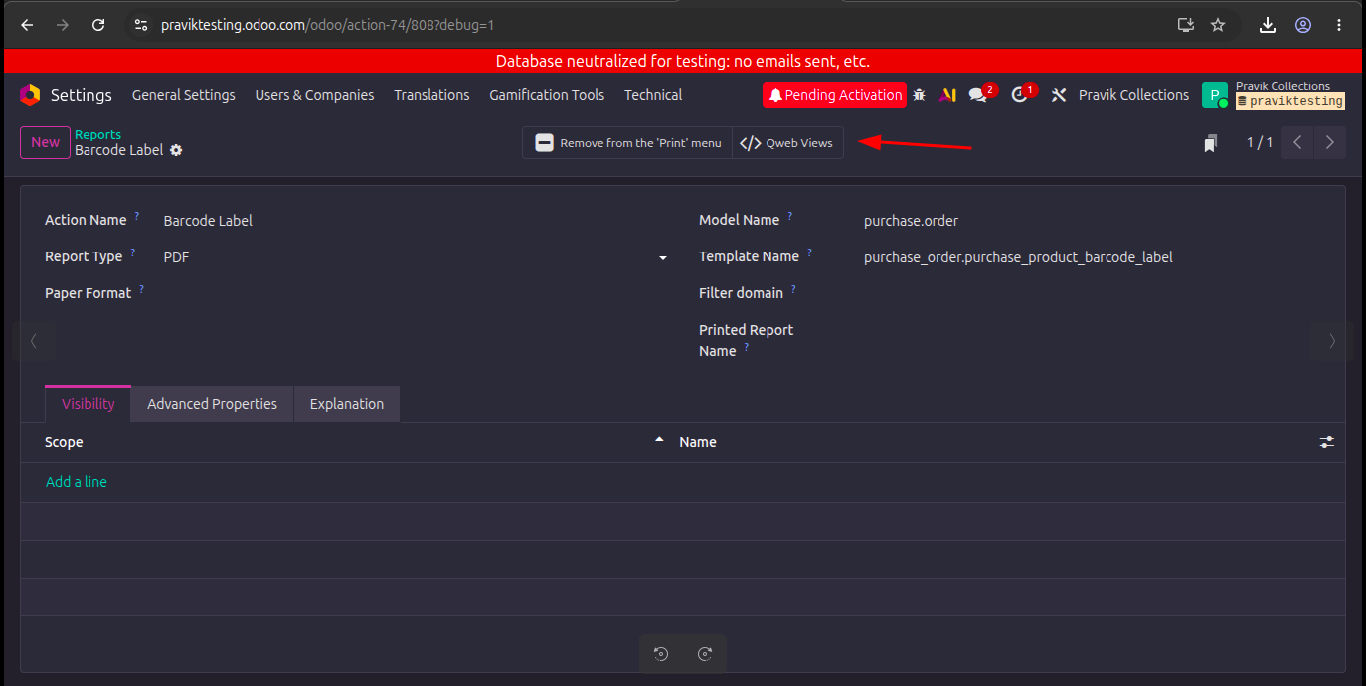
Menu Path: Settings --> Technical --> Reports.
-
Click on new and give Details as mentioned below.
-
Action Name : Barcode Label
-
Report Type : PDF
-
Model Name : purchase.order
-
Template Name : purchase_order.purchase_product_barcode_label
-
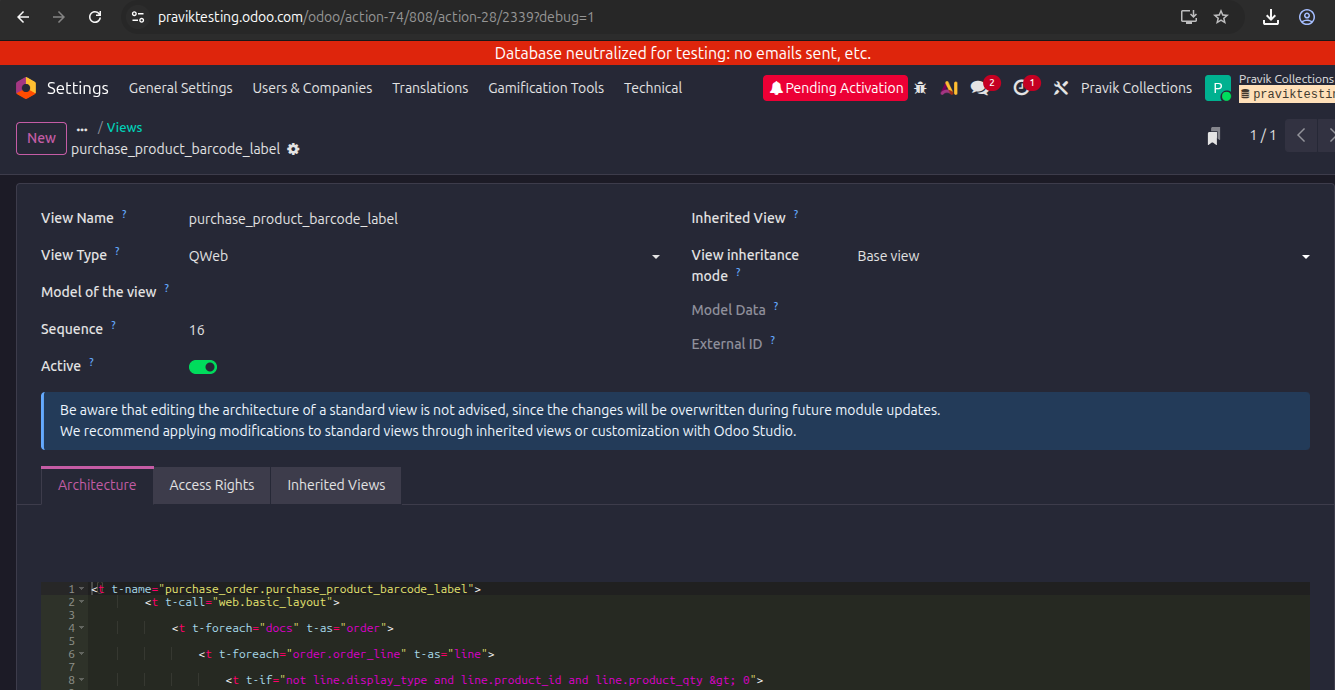
Open the Qweb Views and click on new give the details as mentioned below.
-
View Name : purchase_product_barcode_label
-
View Type : QWeb
-
Give the Xml/Html Code under the Architecture Tab.
<t t-name="purchase_order.purchase_product_barcode_label">
<t t-call="web.basic_layout">
<style>
body { counter-reset: label-count; }
.label-num::before {
counter-increment: label-count;
content: counter(label-count) ". ";
}
</style>
<t t-foreach="docs" t-as="order">
<t t-foreach="order.order_line" t-as="line">
<t t-if="not line.display_type and line.product_id and line.product_qty > 0">
<!-- Repeat labels according to product quantity -->
<t t-foreach="range(0, int(line.product_qty), 2)" t-as="label_index">
<div class="page" style="height:30mm; margin:0; border:0.5px solid #000; box-sizing:border-box; page-break-after:always; page-break-inside:avoid; overflow:hidden;">
<table style="width:100mm; height:100%; table-layout:fixed; border-collapse:collapse; border:none; margin:0 auto; padding:0;">
<tbody>
<tr>
<!-- Left and Right Labels -->
<t t-foreach="range(0, 2)" t-as="column_index">
<td style="width:50%; text-align:center; vertical-align:middle; padding:1mm; border:0.5px solid #000; box-sizing:border-box; overflow:hidden;">
<t t-if="label_index + column_index < int(line.product_qty)">
<!-- Product Name -->
<div style="font-size: 12px; font-weight: bold; text-align: center;">
<span class="label-num"/><span t-field="line.product_id.name"/>
</div>
<!-- Product Price -->
<div style="font-size: 10px; text-align: center;">
Price:
<span t-field="line.price_unit" t-options="{'widget': 'monetary', 'display_currency': order.currency_id}"/>
</div>
<!-- Product Barcode -->
<div t-if="line.product_id.barcode" style="text-align: center;">
<span t-field="line.product_id.barcode" t-options="{'widget': 'barcode', 'symbology': 'Code128', 'width': 300, 'height': 60, 'img_style': 'width:40mm; height:8mm;'}"/>
</div>
<!-- Barcode Number -->
<!--<div t-if="line.product_id.barcode" style="font-size: 9px; text-align: center;">-->
<!-- <span t-field="line.product_id.barcode"/>-->
<!--</div>-->
<!-- Product Reference -->
<div style="font-size: 9px; text-align: center;">
<span t-field="line.product_id.default_code"/>
</div>
</t>
</td>
</t>
</tr>
</tbody>
</table>
</div>
</t>
</t>
</t>
</t>
</t>
</t>
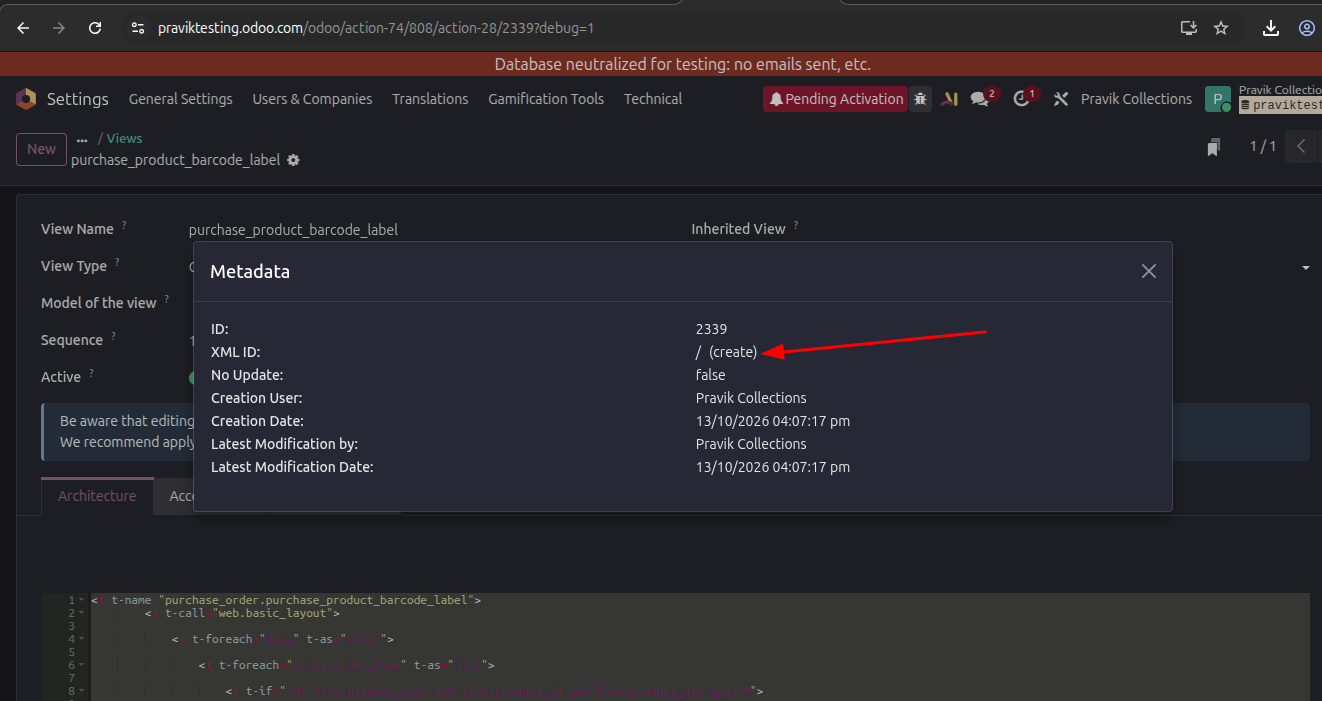
- After that open the Bug Icon and open the Metadata view.
-
Then click the create on XML ID and give the details as shown in below.
-
Module : purchase_order
-
External Identifier : purchase_product_barcode_label

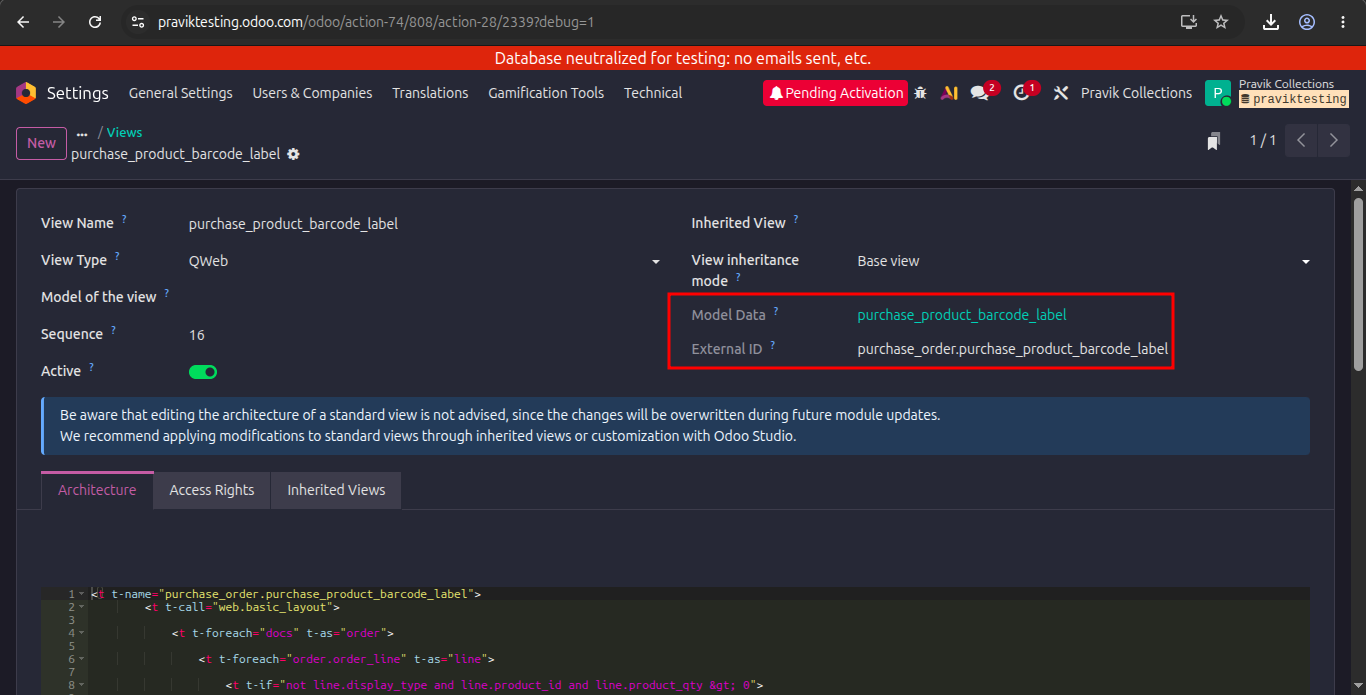
- Save that record and go to that qweb view and there will be shown external id and module.
Menu Path: Settings --> Technical --> Paper Format.
- click on new and give the details as shown in below.
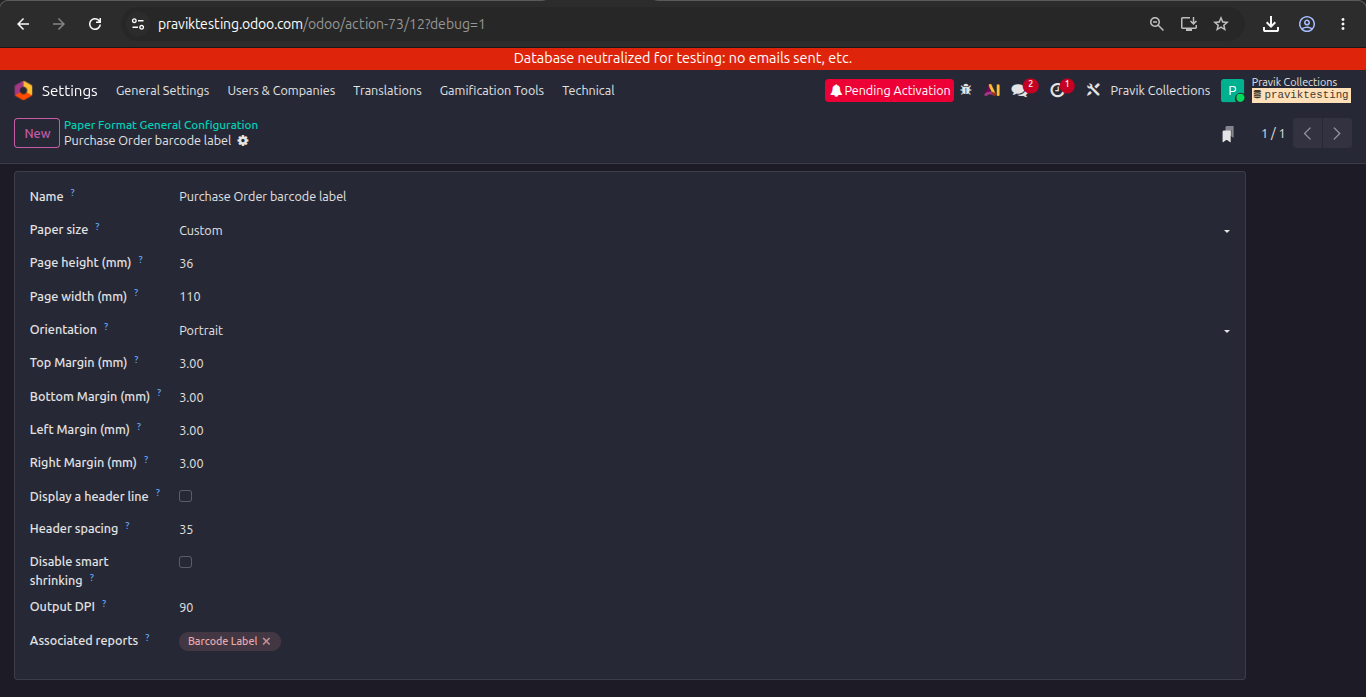
- After creating paper format.
Menu Path: Purchase --> Orders --> Purchase Orders.
- Open any purchase order and click on setting and click on print.
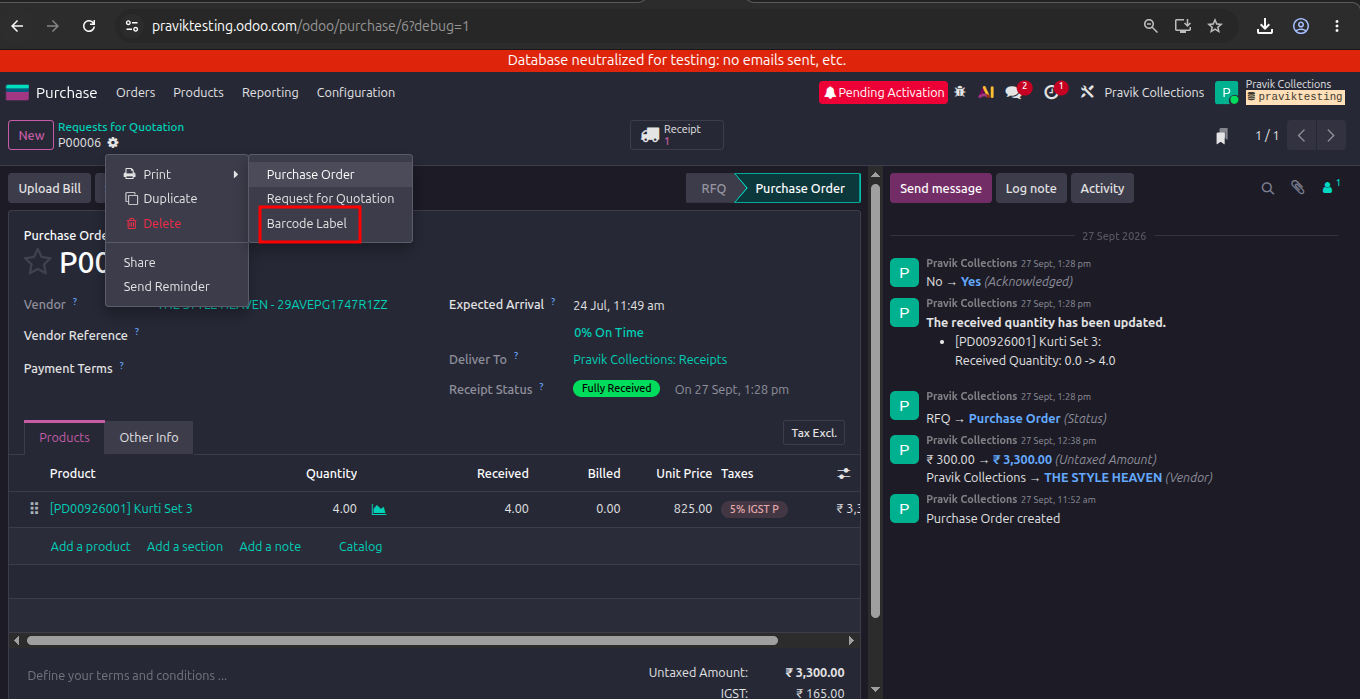
- Print the Barcode label.
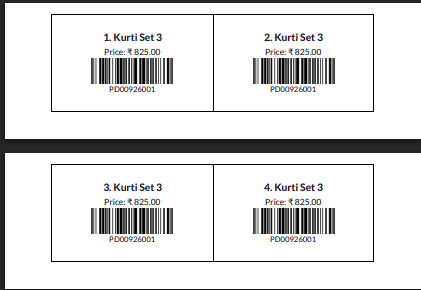
Updated by Botchina Renukanth 3 days ago
Updated by Botchina Renukanth 2 days ago
Update:
- Added label_items to collect labels based on product quantity.
- Changed the loop to print two consecutive labels per row across different products.
- Added borders to both label boxes, including the empty box when the total label count is odd.
- Set page margin and padding to 0 to reduce unwanted spacing.
Updated code:
<t t-name="purchase_order.purchase_product_barcode_label">
<t t-call="web.basic_layout">
<t t-foreach="docs" t-as="order">
<!-- Collect labels in purchase order sequence -->
<t t-set="label_items" t-value="[]"/>
<t t-foreach="order.order_line" t-as="line">
<t t-if="not line.display_type and line.product_id and line.product_qty > 0">
<t t-foreach="range(0, int(line.product_qty))" t-as="qty_index">
<t t-set="label_items" t-value="label_items + [(line, qty_index)]"/>
</t>
</t>
</t>
<!-- Print two consecutive labels per row -->
<div class="page" style="padding:0 !important; margin:0 !important;">
<t t-foreach="range(0, len(label_items), 2)" t-as="label_index">
<div style="width:110mm; height:30mm; margin:0; padding:0; box-sizing:border-box; page-break-inside:avoid; overflow:hidden;">
<table style="width:100%; height:100%; table-layout:fixed; border-collapse:collapse; border:none; margin:0; padding:0;">
<tbody>
<tr>
<t t-foreach="range(0, 2)" t-as="column_index">
<td style="width:50%; text-align:center; vertical-align:middle; padding:1mm; border:0.5px solid #000; box-sizing:border-box; overflow:hidden;">
<t t-if="label_index + column_index < len(label_items)">
<t t-set="line" t-value="label_items[label_index + column_index][0]"/>
<!-- Product Name -->
<div style="font-size:12px; font-weight:bold; text-align:center;">
<span t-field="line.product_id.name"/>
</div>
<!-- Product Price -->
<div style="font-size:10px; text-align:center;">
Price:
<span t-field="line.price_unit"
t-options="{'widget': 'monetary', 'display_currency': order.currency_id}"/>
</div>
<!-- Product Barcode -->
<div t-if="line.product_id.barcode" style="text-align:center;">
<span t-field="line.product_id.barcode"
t-options="{'widget': 'barcode', 'symbology': 'Code128', 'width': 300, 'height': 60, 'img_style': 'width:40mm; height:8mm;'}"/>
</div>
<!-- Product Reference -->
<div style="font-size:9px; text-align:center;">
<span t-field="line.product_id.default_code"/>
</div>
</t>
</td>
</t>
</tr>
</tbody>
</table>
</div>
</t>
</div>
</t>
</t>
</t>
Updated by Botchina Renukanth 1 day ago
- File Demo_video_for_creation_of_barcode_label_.mp4 Demo_video_for_creation_of_barcode_label_.mp4 added
h1. Demo Video was uploaded.
Actions